How to Fill in the CPD Record Form (2023–2026 Cycle) — A Guide for Hong Kong Physiotherapists

Hong Kong's first mandatory CPD cycle — 1 July 2023 to 30 June 2026 — is almost over. Have you filled in your CPD Record Form yet?
This guide walks you through how to fill in the CPD Record Form column by column (with a completed example), and how to generate it in one click — so you can skip the manual scoring and form-filling.
📌 This guide covers the first mandatory CPD cycle (1 July 2023 – 30 June 2026). The form for the next cycle (2026–2029) has not been released yet, and its rules and scoring may change — check the Physiotherapists Board's latest announcements when that cycle begins.
1. Filling in the CPD Record Form: tips and a worked example
How the form is laid out
At the top you fill in the year and cycle dates; the middle is the activity table (six columns); the bottom has the total, a declaration, and your name, registration number and signature.
| Column | What to enter |
|---|---|
| Date | The activity date; for multi-day courses, the start and end dates. |
| CPD Main Category | One of the six categories (I–VI). |
| CPD Code | Only accredited Cat I / II activities have one — leave it blank for Cat III–VI. |
| Title of CPD Programme / Activity | The full name, matching your certificate. |
| Core (C) / Non-core (N) | Enter C or N. |
| CPD Points Attained | The final score (Non-core already halved). |
Five things to watch for
- Halve Non-core points: Core ×1, Non-core ×0.5. A 2-hour Non-core lecture is 1 point, not 2.
- Mind the caps: Cat I is capped at 5 points per day and 15 per course; Cat III and IV combined are capped at 15 points per cycle.
- 75% attendance is required before an activity counts.
- Year 3 (2025–2026) needs an extra declaration: on top of the yearly "5 points" statement, the third-year form asks you to confirm the whole cycle reached "45 points, of which 23 are Core". Total up all three years before you fill it in.
- "Please delete where inappropriate": on the have / have not declarations, strike out whichever does not apply.
A completed example (Year 3, 2025–2026)
The official form below is filled in with the activities listed underneath. The red circles ①–⑤ flag five points to watch:
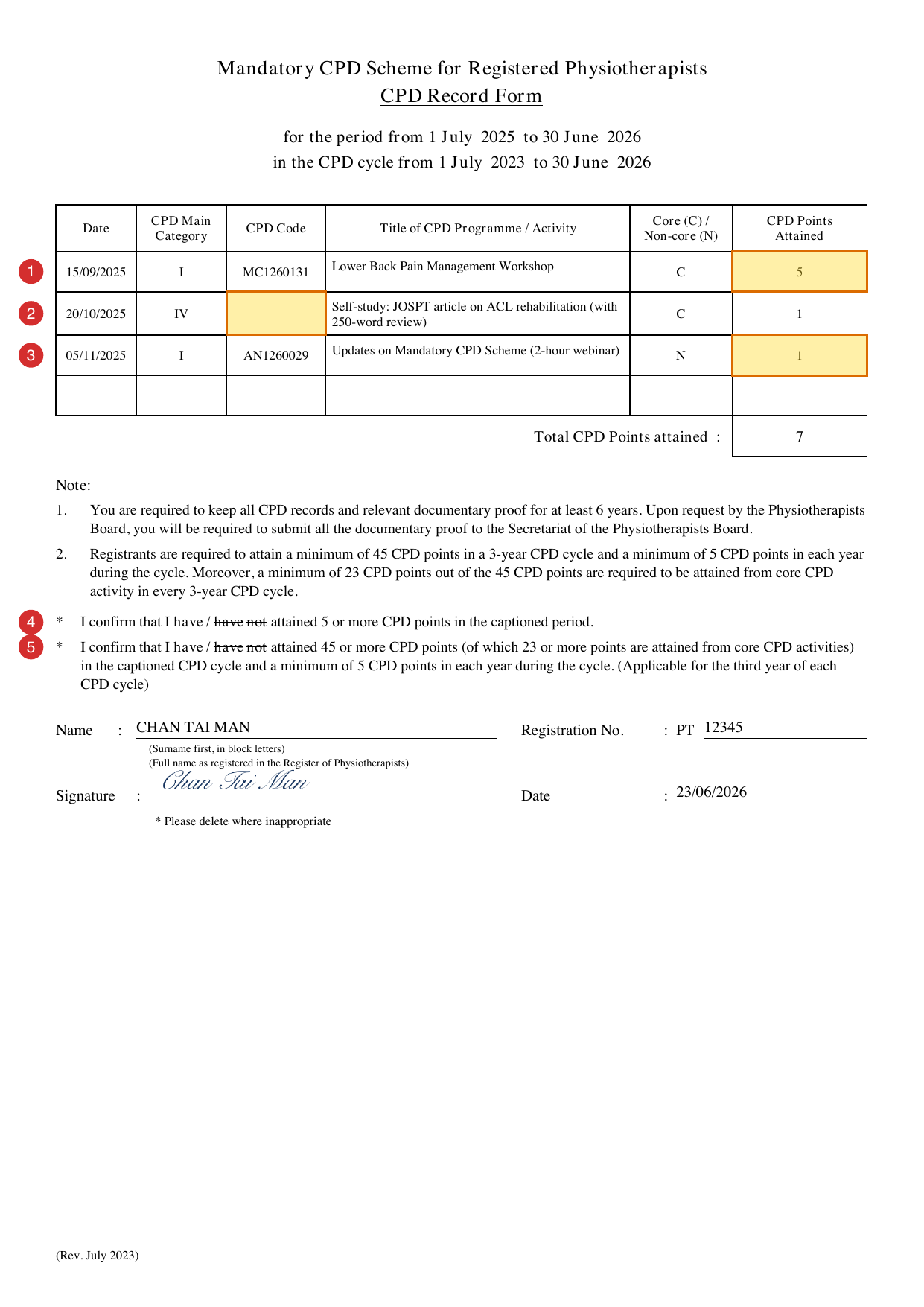
- ① Cat I daily cap of 5 points: even a full day of Cat I counts as at most 5 points per day.
- ② Self-study (Cat IV) has no CPD Code: only accredited Cat I / II activities have one, so leave it blank.
- ③ Halve Non-core: that 2-hour webinar is Non-core, so 2 × 0.5 = 1 point.
- ④ First declaration (every year): 5 or more points that year → keep have, delete have not.
- ⑤ Second declaration (Year 3 only): 45 points for the cycle (with 23 Core) and 5 each year → keep have if you have met it.
Here is the same example in text:
for the period from 1 July 2025 to 30 June 2026 | in the CPD cycle from 1 July 2023 to 30 June 2026
| Date | Category | CPD Code | Title of CPD Programme / Activity | C/N | Points |
|---|---|---|---|---|---|
| 15/09/2025 | I | MC1260131 | Lower Back Pain Management Workshop | C | 5 |
| 20/10/2025 | IV | — | Self-study: JOSPT article on ACL rehabilitation (with 250-word review) | C | 1 |
| 05/11/2025 | I | AN1260029 | Updates on Mandatory CPD Scheme (2-hour webinar) | N | 1 |
Total CPD Points attained: 7
2. The faster way: generate your CPD Record Form in one click
The official Record Form is a scanned PDF with no fillable fields, so you print and handwrite it or rebuild the layout yourself, and total every activity's points by hand. Across a full cycle's worth of activities, that adds up to a fair bit of time.
CPD Database lets members generate a completed CPD Record Form in one click. Log your activities as you go, and the system works out Core/Non-core and the scores, sorts them by year (Period), and lets you download the official-format PDF when it's time to submit.
Step by step
- Sign up free → create an account
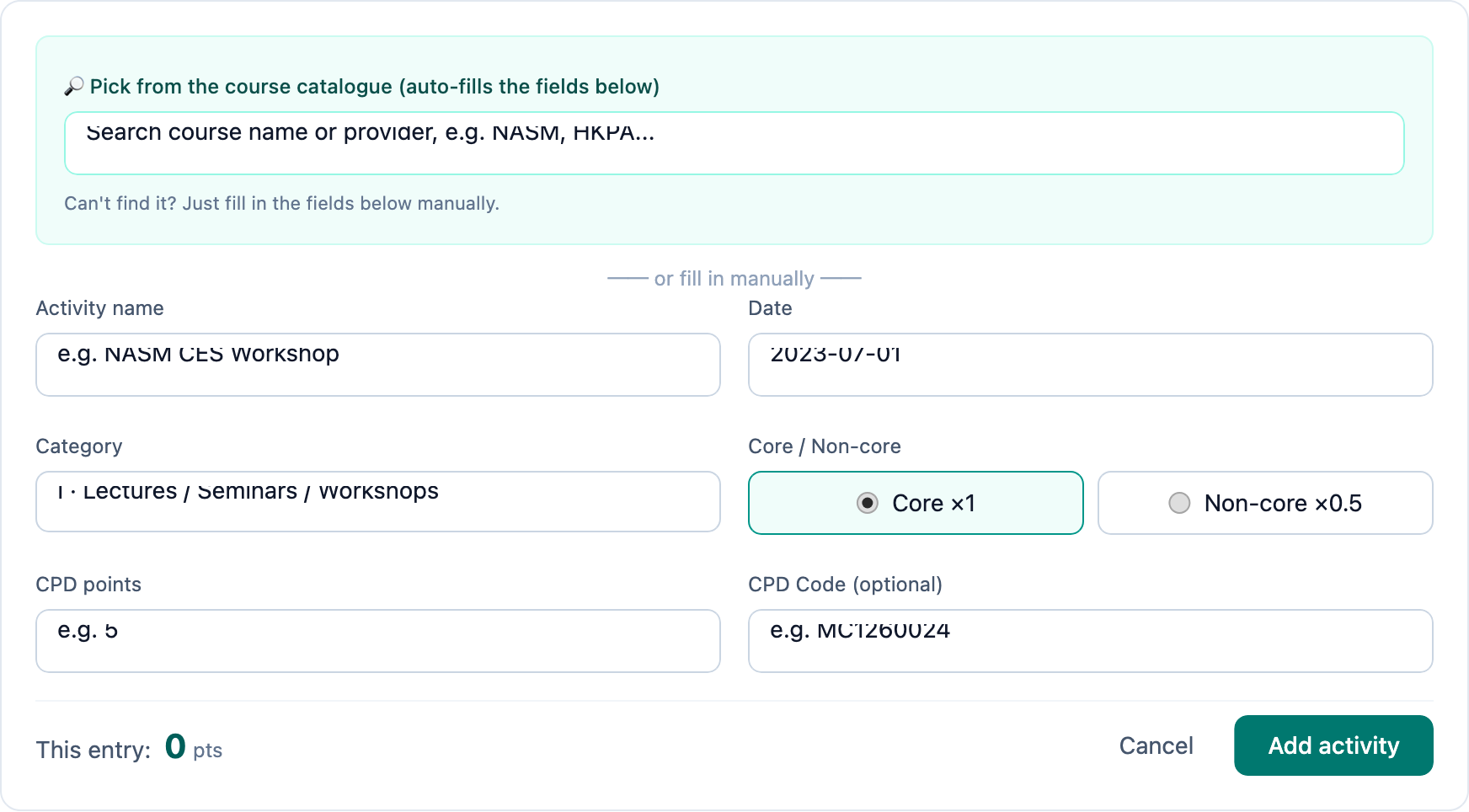
- Add your CPD activities on the "CPD Tracking" page — pick from the course catalogue to auto-fill the CPD Code and points, or add them manually
- Scroll down to the "CPD Record Form generator"
- Enter your name (surname first, block letters) and PT registration number
- Sign directly on screen
- Choose the Period (Year 1 / 2 / 3)
- Preview, then download the PDF — in the official format
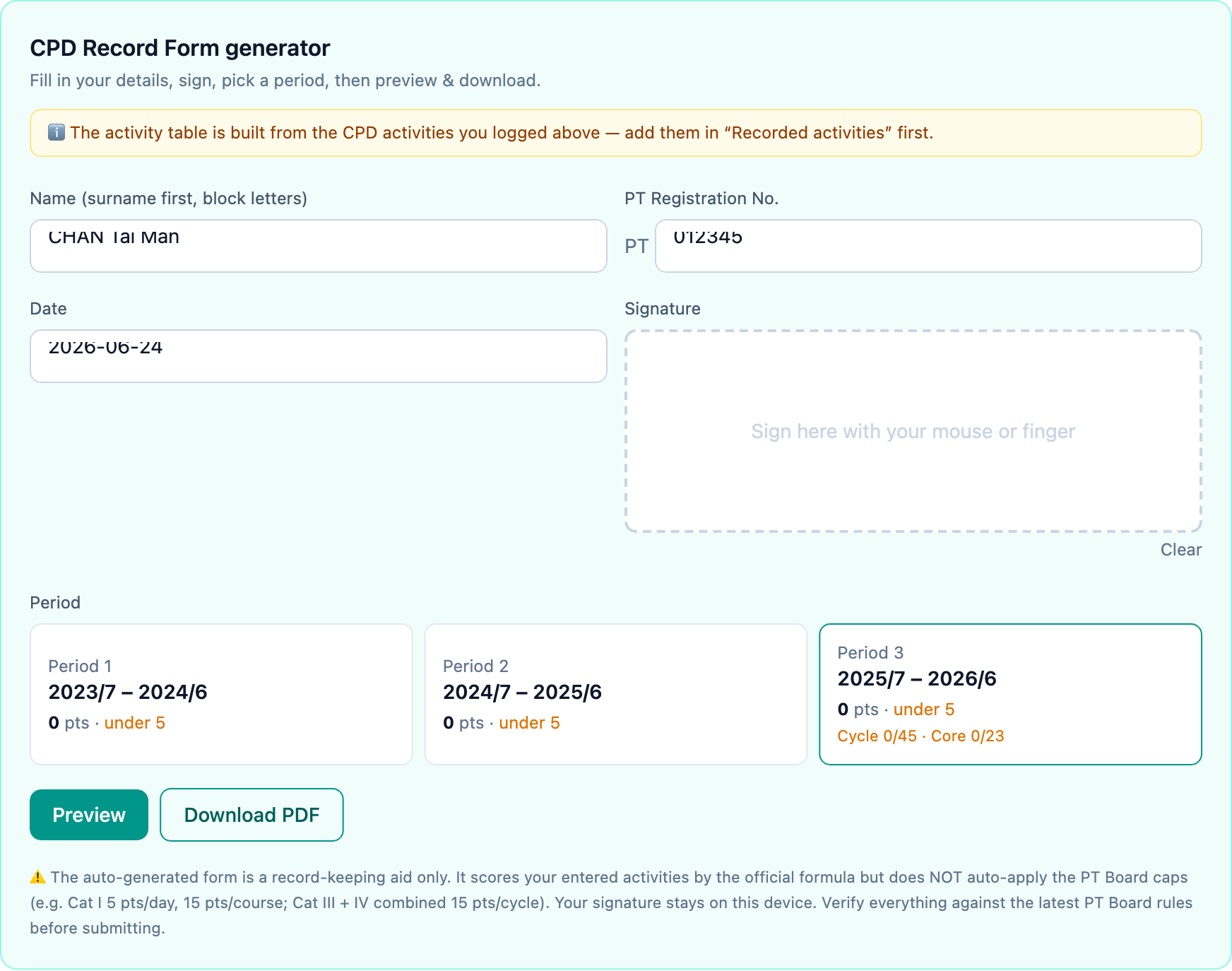
Privacy note: your name, PT registration number and signature are all processed only on your own device — they are never uploaded or stored on our servers.
Note: the generator scores by the official formula but does not automatically apply the caps (for example Cat I's 5 points per day). Before submitting, double-check your activities, CPD Codes and points against the Board's latest rules.
From logging activities to producing the form, it all happens in one place — saving you the manual filling and scoring, and cutting down on mistakes.
👉 Sign up free and try the CPD tracker and Record Form generator.
Related links
Based on the Physiotherapists Board's "Mandatory CPD Manual for Registered Physiotherapists" (May 2025). Always check the Board's latest announcements before you submit.